Canned messages: what they are, and 30 examples for chat and DMs
A canned message is a message you wrote once and send many times. In a chat window the reader sees it arrive in seconds, so a good one has to read like something a person just typed — short, direct, and specific to what was asked. This page covers what the term means, how it differs from a canned reply or canned response, and 30 examples sized for chat rather than email.
Short answer: a canned message is a short pre-written message saved for reuse, usually in live chat, a messaging app, or a team chat tool. Canned message, canned reply, and canned response all name the same thing; the products differ in which word they use and in how long the message is expected to be. The word canned is borrowed from canned food — prepared in advance, opened when needed.
Canned message meaning
The phrase comes from support chat, where a handful of situations account for most of the traffic: hello, one moment please, what are your hours, where is my order, I’m transferring you. An agent handling several chats at once cannot type each of these fresh every time and still answer within the seconds a chat visitor expects, so chat consoles built a library of saved messages that can be sent with a click or a shortcut. Remote-support and live-chat products call this library canned messages; the same feature elsewhere is a canned response, a macro, a saved reply, or a quick reply.
Outside support the idea is the same without the name. The person who runs a shop’s WhatsApp has a saved reply for opening hours. The team lead has a standard “can you add this to the ticket?” in Slack. Anyone who keeps a note of lines to paste into DMs is already using canned messages.
Canned message vs canned reply vs canned response
They are interchangeable. What differs is the vocabulary of the product you are in, and the length the product expects:
| Where you are | What it is called | Typical length |
|---|---|---|
| Live chat and remote-support consoles | Canned messages | One to three lines, often sent in sequence |
| Help desks (Freshdesk, Zendesk, Help Scout) | Canned responses, macros, saved replies | A paragraph or more; may also set ticket fields |
| WhatsApp Business, Instagram, Messenger | Quick replies, saved replies | One to three lines |
| Gmail | Templates (formerly Canned Responses) | A full email |
| Everyday speech | Canned reply | Any |
If you are looking for the longer, email-and-ticket kind, the companion guide on canned responses has 40 of those. This page stays at chat length.
Why chat messages need different rules from email templates
- One idea per message. Chat is read one bubble at a time. A canned message that answers three things in one block gets skimmed; three short messages sent in sequence get read.
- No greeting ceremony. There is no subject line and no sign-off, and the reader already knows who they are talking to. Start with the answer.
- Speed reads as attention. A correct two-line answer that arrives in ten seconds feels more personal than a warm paragraph that arrives in four minutes.
- Placeholders must be filled every time. In a chat window there is no draft stage to catch a stray
{{name}}. The examples below use{{double braces}}so a tool can prompt for each value before sending. - One sentence of your own. The saved part carries the structure; one line specific to this conversation proves someone read the message.
Live chat examples
1. Opening
Hi {{name}}, {{agent_name}} here. I can help with {{topic}} — what’s happening on your side?
2. Please hold
One moment — checking that now. I’ll be back within {{minutes}} minutes; you can stay on this chat.
3. Still working on it
Still on it — this is taking a little longer than I expected. Not stuck, just thorough. Another {{minutes}} minutes.
4. Need one detail
Quick one so I can find your account: what’s the {{identifier}} on the order?
5. Transferring
This is one for our {{team}} team. I’m moving the chat over now with everything you’ve told me, so no need to repeat it.
6. Idle visitor
Still there, {{name}}? I’ll keep this open for a few more minutes. If you get pulled away, reply here any time and we’ll pick it up.
7. Closing
That should sort it. Anything else while I’m here? If not, have a good {{day_part}} — and this chat stays in your history if you need it.
8. Out of hours (auto or manual)
Thanks for the message — we’re offline right now. We’re back at {{opening_time}} {{timezone}} and you’ll hear from us first thing. Leave your question here and it’s already in the queue.
WhatsApp, Messenger, and Instagram examples
9. Opening hours
We’re open {{days}} from {{open}} to {{close}}. Walk-ins welcome; for {{service}} it’s best to book: {{link}}.
10. Order status
Order {{order_no}} is {{status}}. Expected delivery: {{date}}. Track it here: {{link}}.
11. Price enquiry
{{item}} is {{price}}. That includes {{included}}. Want me to hold one for you?
12. Booking confirmed
You’re booked: {{service}} on {{day}} at {{time}}. Address: {{address}}. Reply here if you need to change it.
13. Booking reminder
Reminder: {{service}} tomorrow at {{time}}. Reply YES to confirm or tell us if you need a new time.
14. Out of stock
{{item}} is out of stock at the moment — back around {{date}}. I can message you when it lands, or {{alternative}} is available now.
15. Moving off the public thread
Thanks for flagging this. I’ve sent you a direct message so we can sort it out without your details on the post.
16. Complaint, first reply
I’m sorry — that’s not what should have happened. Send me the {{detail}} and I’ll look at it personally today.
Slack and Teams DM examples
17. Quick ask
When you have a minute: could you {{request}}? No rush before {{date}}.
18. Nudge without nagging
Gentle bump on {{thing}} — still needed for {{reason}} by {{date}}. Let me know if the date doesn’t work and I’ll adjust.
19. Take it to a thread
Let’s move this into a thread so the channel stays readable — replying there 🧵
20. Add it to the ticket
Good catch. Can you add that to {{ticket}} so it doesn’t get lost in chat? Then it’s on the board for {{owner}}.
21. Heads-down
Heads-down on {{task}} until {{time}} — will reply after. If it’s urgent, ping {{backup}}.
22. Meeting running late
Running {{minutes}} min late — start without me, I’ll catch up from the notes.
23. Handing over
Handing {{item}} to you: current state is {{state}}, next step is {{next_step}}, and the open question is {{question}}. Everything’s in {{link}}.
Recruiting and outreach DM examples
24. First touch
Hi {{name}} — I saw {{specific_thing}} and wanted to say hello. I work on {{your_area}}; if that overlaps with what you’re doing, happy to compare notes.
25. Interested, need two facts
Thanks for reaching out about {{role}}. Two quick questions before a call: what’s the range, and is it {{remote_or_location}}?
26. Not now
Appreciate you thinking of me. Not looking right now, but happy to stay in touch — try me again in {{timeframe}}.
27. After no reply
Last note from me on this — if the timing isn’t right, no need to reply. If it is, the next step is {{next_step}}.
One-liners worth saving anyway
The most-used canned messages are the shortest. They are worth a slot because they are the ones sent twenty times a day.
28. Received
Got it — back to you by {{time}}.
29. Link with context
Here you go: {{link}} — the part you need is {{section}}.
30. Confirming a time
Confirmed, {{day}} at {{time}} {{timezone}}. I’ll send the {{link_or_location}} shortly.
Turn a saved message into an answer for this conversation
A reusable message should save typing without making decisions for you. Before sending an order update, check the actual order status and delivery estimate; before promising a refund, check the policy and your authority to approve it.
| Saved structure | Adapted example | Check before sending |
|---|---|---|
| Order {{order_no}} is {{status}}. Expected delivery: {{date}}. | Order 1042 has shipped. Expected delivery: Thursday. I checked the carrier update after your message. | Confirm the order and carrier estimate; keep the date provisional if it is not guaranteed. |
| I’ll be back within {{minutes}} minutes. | I’m checking the payment record now. I’ll update you in five minutes, even if I’m still investigating. | Choose a timeframe you can meet and follow up if the issue is still open. |
| Could you {{request}} by {{date}}? | Could you add the browser version to ticket 82 by Friday? It will help us reproduce the issue. | Include one concrete action, the right reference, and the reason you need it. |
These are illustrative edits, not facts to reuse. Fill every placeholder, remove details that do not apply, and review the tone. If none of the examples fits, start with the free canned response generator and review its draft before saving it.
Where canned messages live, and why that is the problem
Every messaging tool has its own version of this feature and none of them talk to each other. WhatsApp Business keeps quick replies behind a / shortcut in its own app. Meta Business Suite has saved replies for Messenger and Instagram. Live-chat consoles keep canned messages inside the console. Slack and Teams have no built-in saved-message feature at all, which is why so many people keep a notes document open beside them.
The moment one conversation moves from the chat widget to WhatsApp to a Slack DM, you are maintaining three libraries, or copying from a document.
How to send them from any chat box in the browser
A browser text expander stores the messages at the text-field level instead of inside one product. Keyjot opens beside the cursor with one rebindable hotkey in supported browser text fields — WhatsApp Web, Slack in the browser, Messenger, a live-chat console, a CRM. Number keys insert saved messages, the {{variables}} are detected and asked for before insertion, and the AI option drafts the messages that cannot be saved in advance from the message you have selected on the page.
- Save each message above as its own template, named by situation — “Hold”, “Out of hours”, “Booking confirmed”.
- Keep the
{{double braces}}; Keyjot turns each into a fill-in field at insert time so nothing goes out blank. - Click into the chat box on a supported site, press the hotkey, and pick the message by number.
- Fill the variables, add one line for this conversation, and send.
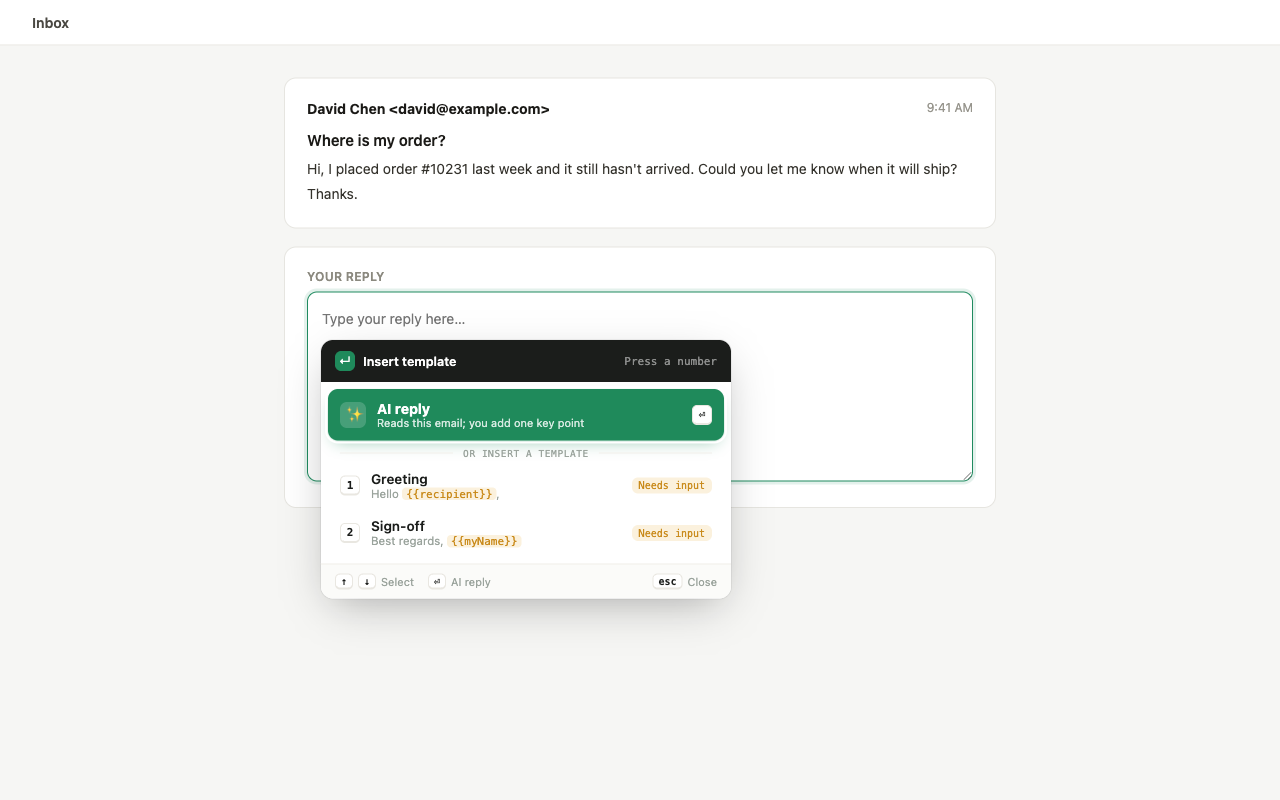
One library of canned messages, every chat box
Use the same saved messages in live chat, WhatsApp Web, Slack, Messenger, CRMs, and other supported browser text fields.
Add Keyjot to ChromeQuestions
What is a canned message?
A short, pre-written message saved so it can be sent again without retyping. The term is most common in live chat and messaging tools, where the same greeting, hold notice, hours reply, or order-status answer goes out dozens of times a day. Canned comes from canned food: prepared in advance, opened when needed.
Is a canned message the same as a canned reply or a canned response?
Yes — three names for one thing. Chat and messaging products tend to say canned message, help desks say canned response or macro, and canned reply is the everyday phrase. The practical difference is length: a canned message is written for a chat window, so it is usually one to three lines.
Do canned messages make customer service feel impersonal?
Only when the message does not answer what was asked. A canned message that answers directly, has the customer’s details filled in, and is followed by one line written for this conversation reads as fast and attentive. Customers notice a mismatch, not reuse.
How do I send canned messages in WhatsApp, Slack, or a chat widget from the browser?
Each tool has its own saved-message feature and none of them share. A browser text expander such as Keyjot keeps the messages at the text-field level: press one hotkey in a supported browser chat box, pick the message by number, fill in any variables, and send. The same library then works in WhatsApp Web, Slack, Messenger, a live-chat console, or a CRM.