Magical alternatives for Chrome
Magical is one Chrome extension doing three jobs: expanding saved text, running AI on what you write, and moving data between tabs. People go looking for alternatives when they only ever wanted the first two — or when the metered AI runs out. Here is what the trade actually looks like.
First, be clear about which half you use
Magical's genuinely distinctive feature is not text expansion — plenty of tools expand text. It is cross-tab data transfer: scraping fields off one page and filling them into another, so a record moves from a listing, a profile, or a support ticket into a CRM or a spreadsheet without retyping. That is data-entry automation, and it is a different job from writing replies.
So the first question is simply whether you use it. If you do, most alternatives will not replace Magical, because most of them do not attempt that at all — including Keyjot. If you do not, you are carrying an automation suite to solve a typing problem, and a narrower tool will be a better fit.
Rule of thumb. Using Magical to move data between systems? Keep it — that is a category of its own. Using it to stop retyping replies? That is the part where alternatives compete, and where being narrower is an advantage rather than a compromise.
Second, the metering question
Magical offers a free tier with a limited monthly allowance of AI actions, with heavier use and team features on paid subscription tiers. That structure is fine if your AI use is occasional and it is genuinely generous to start with — but it means the cost of the tool scales with how much you actually lean on it, and the ceiling arrives exactly when the tool has become useful enough to depend on.
It is worth checking Magical's own pricing page for the current allowance and tier prices before comparing; the numbers in this category change often, and third-party summaries of them go stale quickly.
Third, where the interface lives
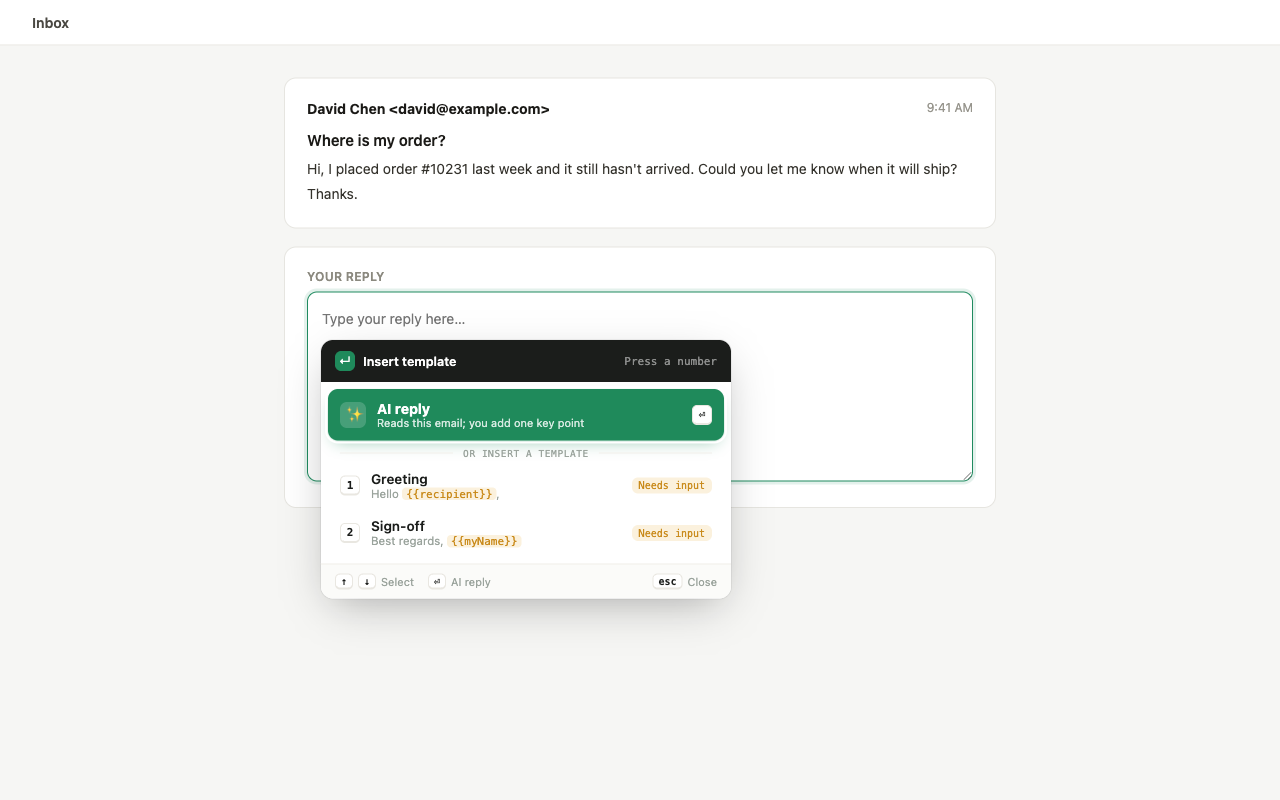
This is the one people underrate until they have lived with a tool for a month. Extensions in this space either put a persistent affordance on the page — a floating button, a badge, a sidebar — or they stay invisible until a keystroke summons them at the caret.
The persistent kind is easier to discover, which is why most tools ship it. It is also present on every page you visit for the rest of time, occasionally overlapping something you were trying to click. If you answer messages all day, invisible-until-summoned wins on the timescale that matters.
Side by side
| Magical | Keyjot | |
|---|---|---|
| Scope | Text expansion, AI actions, and cross-tab data transfer / autofill | Reply drafting and saved templates only |
| Cross-tab data transfer | Yes — the standout feature | No |
| Pricing model | Free tier with a metered monthly AI allowance; paid subscription tiers above it | One-time $3.99 access pass, no subscription |
| AI cost model | Metered actions per month, by tier | One token per generated reply; 100 included, optional packs after |
| Templates metered? | Free tier limits apply to AI actions | Never — templates and hotkeys are unlimited and consume no tokens |
| Contextual reply drafting | Yes, among its AI actions | Yes — reads the message being answered, plus one line of intent |
| Team features | Yes, on paid tiers | No |
| Maturity | Established, large install base | New — launching on the Chrome Web Store |
What Keyjot does instead
One trigger — ⌘ ; on macOS,
Ctrl ; on Windows and Linux, rebindable —
opens a command window beside your cursor in whatever field you are typing in. From there,
number keys 1–9 insert saved templates
(with {{variable}} slots it asks you to fill), and the AI option drafts a reply
from the message you are answering plus one line of intent. Drafts can be wrapped in a saved
greeting and sign-off and switched between formal, friendly, short, and decline.
It works in standard inputs, textareas, and rich-text fields across Gmail, Outlook, LinkedIn, support consoles and forums. Message text, generated drafts, saved templates, and key points are excluded from analytics — see the privacy policy.
What it deliberately does not do: move data between tabs, autofill forms from other pages, or run team workspaces. If those are why you installed Magical, this is not a replacement, and saying otherwise would waste your time.
If you only wanted the typing half
Keyjot is available now on the Chrome Web Store.
Add to Chrome — $3.99 one-timeQuestions
Is there a Magical alternative without a subscription?
Yes. Keyjot is a one-time $3.99 access pass that includes 100 AI reply tokens, with unlimited unmetered saved templates and hotkeys. It does not do cross-tab data transfer or autofill, so it is only a fair swap if those were not why you were there.
Can I run both?
Yes — they are separate extensions with separate triggers. If you rely on Magical for data transfer but want a different reply workflow, nothing stops you keeping both installed; just rebind one of the shortcuts if they collide.
Does Keyjot have a free tier?
No. It is a single one-time payment rather than a free tier with a metered ceiling, which is a deliberate trade: you cannot try it for nothing, and it also cannot run out on you mid-week.