TextExpander alternatives: what to check before you switch
TextExpander is the incumbent in this category for a reason, and most "alternatives" articles skip the part where it is the right answer. This one does not. Below: the three questions that actually decide it, an honest comparison table, and where Keyjot fits — which is not everywhere.
Short version. If you expand text outside a browser, or your team shares a governed snippet library, stay on TextExpander — a Chrome extension genuinely cannot replace those. If everything you type happens in browser tabs and you are paying a per-seat subscription for what amounts to a keystroke, the switch is worth costing out.
Question 1: does your typing leave the browser?
This is the one that settles most cases, and it is worth answering honestly rather than aspirationally.
TextExpander runs as native software on macOS, Windows, iPhone and iPad, plus a browser extension. That means a snippet fires in Apple Mail, in Slack's desktop app, in a code editor, in a native CRM client, and on your phone. Every browser-only alternative — Keyjot included — gives that up entirely. There is no partial version of this trade: outside the tab, a Chrome extension does not exist.
So: spend a day noticing where you actually retype things. If a meaningful share of it is outside Chrome, the rest of this page is academic and you should stay put.
Question 2: are you one person or a governed team?
TextExpander's team tiers exist to solve a real organisational problem — one approved wording for a policy, shared across a support org, updated centrally, with the update propagating to everyone. That is genuinely worth a per-seat fee when you need it, and it is not a feature an individual-focused tool tends to replicate.
For an individual, compare the active-snippet limits and features you actually need. TextExpander’s Free plan includes 5 active Snippets, so a subscription is not required for every user. Keyjot is a paid alternative for a personal browser workflow; it has no shared team library.
Question 3: do you need replay, or do you need drafting?
A classic text expander replays wording you already wrote. It cannot help with the message that is a bit different from every other message — and for a lot of people, that category is most of the inbox.
This is where the newer tools diverge, and it is worth being precise, because "AI" covers at least three different features in this category:
- Snippet suggestion — the tool watches context and surfaces which of your existing snippets probably applies. TextExpander's own AI features are in this territory.
- Rewriting — you select text you wrote and the tool adjusts tone, length, or grammar.
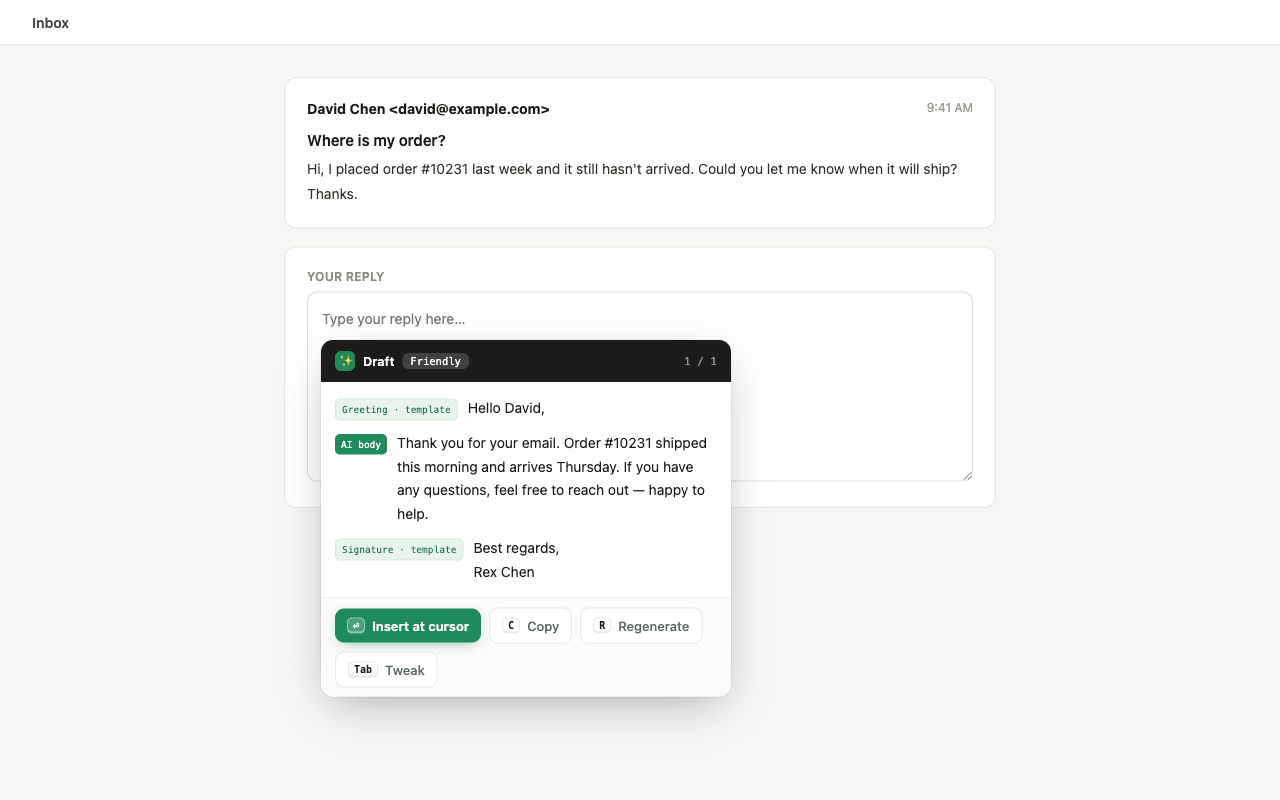
- Contextual drafting — the tool reads the message you are replying to and writes a new reply from it.
These are not interchangeable. If your problem is "I retype the same paragraph," suggestion and replay solve it. If your problem is "every reply is slightly different and I have four hundred of them," only drafting does.
Side by side
| TextExpander | Keyjot | |
|---|---|---|
| Where it runs | macOS, Windows, iOS, plus browser extensions | Chrome and Chromium browsers only |
| Pricing model | Free tier; paid per-user subscriptions | One-time $3.99 access pass |
| Listed price | Free forever with 5 active Snippets. Pro: $60/user/year ($5/month equivalent); Business: $120/user/year ($10/month equivalent). Prices in USD before applicable taxes. See textexpander.com/pricing for current figures. | $3.99 once, including 100 AI reply tokens |
| Saved snippets | Core feature, large libraries, abbreviation triggers | Unlimited and unmetered, on number keys 1–9 |
| Fillable variables | Yes, including fill-in fields and scripting | Yes — {{recipient}}-style, detected automatically, prompted on insert |
| Team snippet sharing | Yes, on team plans — central library and permissions | No |
| Contextual AI drafting | AI Recommendations surface existing Snippets in Chrome | Yes — reads the message being answered, plus one line of intent |
| AI cost model | Check the vendor’s current plan feature matrix | Token per generated reply; 100 included, optional packs after |
| Maturity | Long-established, large user base, extensive docs | Available on the Chrome Web Store |
The honest case against switching to Keyjot
Three of them, and they are real:
- It is browser-only. Covered above, and it is the big one.
- It is new. TextExpander has years of edge cases found and fixed, an import path from other tools, and a support organisation. Keyjot is a newer product. If you are moving a snippet library you depend on, that asymmetry matters.
- No team tier. If shared, governed wording is the point, Keyjot does not do it.
The case for it
If your work is browser-shaped — Gmail or Outlook on the web, LinkedIn, a support console, a forum — then the cross-platform half of a subscription is capacity you are renting and not using. Keyjot collapses templates and drafting behind one caret-anchored trigger (⌘ ; on macOS, Ctrl ; on Windows and Linux, rebindable), and charges once instead of monthly. Templates and hotkeys are unlimited and unmetered; only generated replies consume a token.
Message text, generated drafts, saved templates, and key points are excluded from analytics; the privacy policy spells out what is and is not collected.
One-time, not per seat
Keyjot is available now on the Chrome Web Store.
Add to Chrome — $3.99 one-timeQuestions
Is there a text expander without a subscription?
Yes. Several browser-only tools are sold as a one-time purchase or have a free tier, largely because a browser extension does not carry the cost of maintaining native apps on four operating systems. Keyjot is one of them: a one-time $3.99 access pass, with unlimited unmetered templates and hotkeys.
Can I import my TextExpander snippets?
Not automatically — Keyjot has no importer today. Templates are created in its own library. For a large existing collection, factor the manual migration into the decision.
Does Keyjot work in Edge, Brave, or Arc?
It is built for Chrome and Chromium-based browsers, which is what those are. It is distributed through the Chrome Web Store.
What happens when the 100 included tokens run out?
Saved templates and hotkeys keep working — those are unlimited and never consume tokens. Only generated replies do, one per reply, and further token packs are optional.